
Introduction
Many website owners and SEOs focus on link building as a core strategy, like guest posts or digital PR, but often ignore one of the most powerful and affordable SEO tools they already have: internal linking.
If you’re having trouble getting important pages noticed by search engines, improving your rankings, or helping users move easily through your site, the problem might not be a lack of outside links. It could be how your site’s strength is shared within your own pages.
When internal linking is treated as an afterthought, the consequences quietly compound:
- High-value pages remain buried deep in the site architecture.
- Important content gets left out and does not get much support from other pages on your site.
- The value from your hard-earned backlinks is spread too thin or lost.
- Search engines have a hard time quickly and clearly understanding your site.
- Users experience friction, leading to lower engagement and conversions.
For SEOs investing heavily in off-page strategies, this is especially costly. Even the strongest backlinks lose impact if internal links fail to channel that authority toward priority pages.
This guide does more than just tell you to add a few links. You’ll learn how to use internal linking as a smart way to make your outside links stronger, build your site’s expertise, and fit with how search engines work now.
Backed by expert insights and a real-world case study, we’ll break down how to:
- Set up internal links so search engines can easily crawl your site and send value to the right pages.
- Help your most important pages and valuable content with links that have a clear purpose.
- Remove pages that are not linked to and fix parts of your site that block easy navigation.
- Connect your internal links with main topic pages, related groups of content, and ways to show your site’s expertise.
By the end of this guide, you’ll have a reliable, step-by-step way to check, improve, and keep your internal linking strong for the future. You’ll learn how to:
- Increase organic traffic by helping search engines discover and prioritize the right pages.
- Improve your rankings by sharing your site’s value with the right pages.
- Get users more involved by making your site easy to use and helping them find what they want.
- Build your site’s expertise so it earns and deserves trust from more people.
Whether you’re a beginner seeking clarity or an experienced SEO looking to refine advanced strategies, this guide will show you how to ensure every internal link works as hard as your backlinks do and how to turn your site structure into a competitive SEO advantage.
What Are Internal Links and Why Do They Matter for SEO?
What Are Internal Links?
Internal links are hyperlinks that connect one page on your website to another page on the same domain.
Unlike external links that go to other websites, internal links keep users and search engines on your site, guiding them through your content, pages, and conversion paths.
Examples:
- A blog post linking to a related guide
- A category page linking to individual service pages
- A pillar page linking to related supporting content
When used throughout your site, these links create your website’s structure, shaping how trust, meaning, and visitors move through your pages.
The Role of Internal Links in SEO (Why They’re Foundational)
From an SEO perspective, internal links help two important groups at the same time:
- Search engine crawlers help them to find, understand, and rank your pages
- Users help them to navigate logically and find relevant information
Think of internal links as roads. If the roads are not planned well, search engines have trouble exploring your site, and users get lost. If the roads are well organized, both can easily reach the most important pages.
For people working hard to get backlinks and online mentions, internal links decide where that trust and value actually ends up on your site.
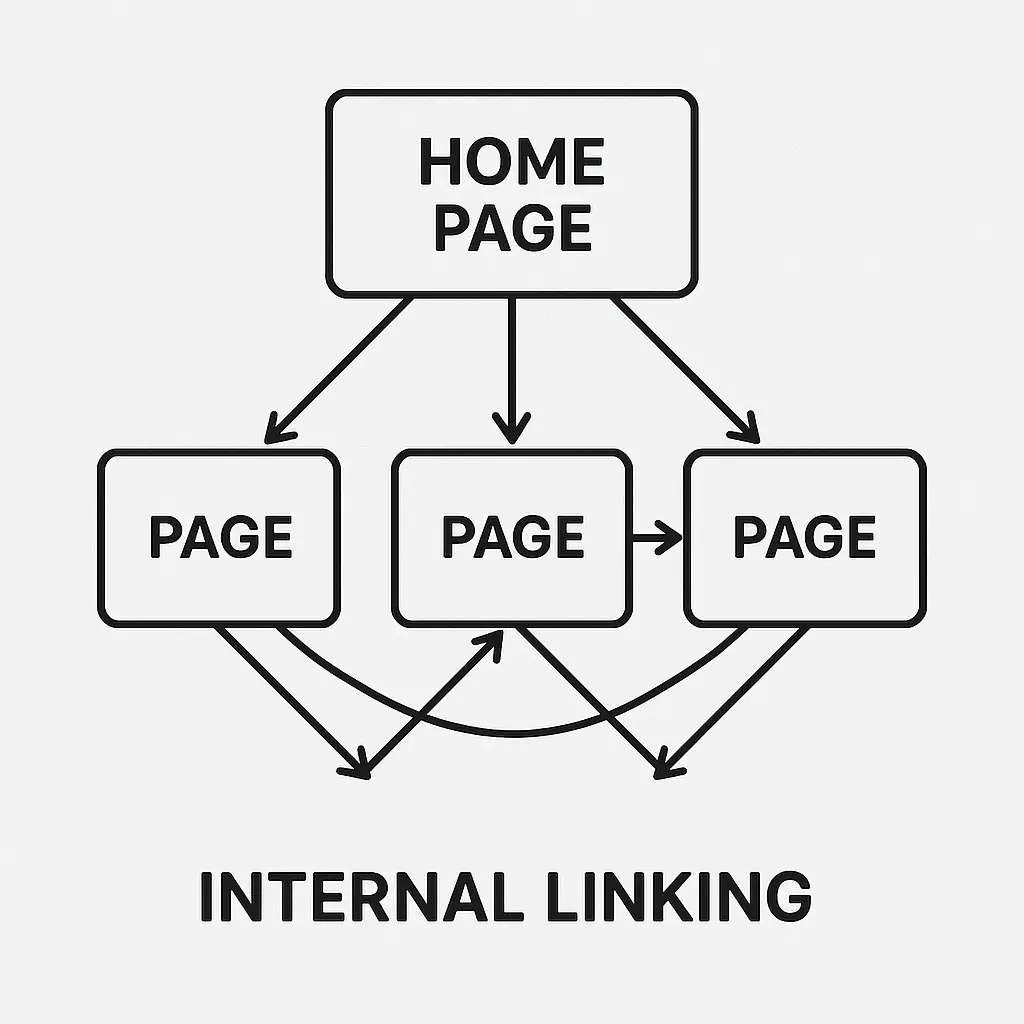
Key SEO Benefits of Strategic Internal Linking
1. Crawlability & Indexing
Problem:
Search engines can’t rank what they can’t find.
How internal links solve it:
Internal links act as crawl pathways, helping search engines:
- Discover new and deep pages
- Revisit updated content faster
- Understand how pages relate to each other
Pages with no or very few internal links, sometimes called orphan pages, often struggle with indexing by search engines, even if the content is great.
✅ Result: More pages indexed, updated content crawled faster, fewer blind spots.
2. Link Equity Distribution (Maximizing Your Backlinks)
Every backlink you get, whether from guest posts, special mentions, or online publicity, brings value to a specific page on your site.
Without strategic internal linking, that equity often stops there.
Internal links allow you to:
- Send value from popular or well-linked pages to your most important pages
- Support new or underperforming content
- Support your main keywords and important URLs
If you focus on getting links from other sites, this is where internal linking increases the value of those links, turning one backlink into benefits for your whole site.
3. User Experience (UX) & Engagement Signals
Search engines increasingly reward sites that users find helpful and intuitive.
Well-planned internal links:
- Guide users to relevant next-step content
- Encourage visitors to stay longer and view more pages
- Lower the number of people who leave quickly by giving them what they are looking for
When visitors naturally explore more of your site, it shows search engines that people like your content, which can help your rankings and sales.
4. Site Structure & Topical Relevancy (Authority Building)
Internal linking helps define:
- Which pages are most important
- How topics are grouped
- What your site is an authority on
By linking related content together, you:
- Make clear topic groups
- Show how your topics are connected
- Show search engines that your site is knowledgeable, detailed, and useful
This is how internal links support topical authority, a core ranking advantage in competitive niches.
💡Internal links aren’t just navigation tools; they are important tools for SEO. When used the right way, they make your site easier to explore, boost the value of your backlinks, improve user experience, and help your site become a trusted source, all without extra advertising or link building outreach costs.
In the next sections, we will go from ideas to action, showing you exactly how to check, improve, and grow an internal linking plan that helps both your rankings and your earnings.
How Internal Links Power Rankings, UX, and Site Authority
Internal linking is important for search engine rankings, user experience, and site authority. When done well, each internal link makes the others stronger, creating a powerful combination that many sites do not fully use.
Let’s break down how this works in practice.
1. Improved Search Engine Rankings
How Internal Links Signal Importance to Search Engines
Search engines use internal links to determine:
- Which pages matter most
- How is the content related?
- Where authority should flow
Pages with more relevant internal links, especially from important pages, are seen as more valuable on your site. This is why your homepage, main content, and best-performing pages often rank higher: they naturally get more internal links.
If a page isn’t internally linked, Google treats it as low-priority even if it’s well-written.
Link Equity:
Link equity, also known as link juice, passes through internal links. Here’s the key insight most SEOs miss:
Backlinks do not help your whole site right away; they help the page they link to. Internal links decide where that strength goes next.
Strategic internal linking allows you to:
- Send authority from strong backlinks to your most important pages.
- Support newer content without waiting for external links.
- Make keywords stronger by using relevant anchor text.
For off-page SEO efforts, internal linking acts as a multiplier. It turns single backlinks into bigger ranking results.
Understanding the Google’s Perspective
Google’s official documentation consistently emphasizes that internal links help it:
- Understand site structure
- Identify content hierarchy
- Contextualize pages within broader topics
A site with good internal links makes it easier for Google to evaluate Experience, Expertise, Authoritativeness, and Trustworthiness (E-E-A-T) by showing how your content is connected and supports main ideas.
In short, internal links help Google understand what you’re an expert in and which pages prove it.
2. Enhanced User Experience (UX): Beyond Rankings
Guiding Users Through Intent-Driven Content Journeys
Internal links shouldn’t exist just to please crawlers. They should answer the user’s next logical question.
Examples:
- Beginner guide → advanced tutorial
- Informational blog → comparison page
- Educational content → service or conversion page
When done well, internal linking helps users find what they need instead of just clicking around randomly.
Reducing Friction & Increasing Engagement
A logical internal link structure:
- Keeps users on-site longer
- Increases pages per session
- Reduces users quickly leaving your site
Instead of forcing users to hunt through menus or search bars, internal links bring solutions directly to them right when intent is highest. This is where internal linking helps turn visitors into customers, not just improve SEO.
Use Internal Linking to Grow
Most sites link internally for SEO basics. Few use it to plan the path users take through their site. By designing internal links around:
- Awareness → consideration → decision stages
- Informational → commercial intent
- Trust-building → conversion actions
You make your site stand out by making it easier for people to pick you, not just find you.
3. Stronger Site Authority & Topical Relevance
Building Authority on Purpose
Internal links define topical boundaries. When related pages consistently link to each other and back to a central pillar, you create:
- Clear content silos
- Strong topic connections
- Deeper coverage of your main topics
This tells search engines:
“This site doesn’t just mention this topic, it owns it.”
Building Topic Authority Across Your Site
Topical authority isn’t built with one article or one backlink. It is built using a clear internal linking structure.
Internal links:
- Connect supporting content to core topics.
- Stop the authority from spreading to unrelated pages.
- Help new content gain authority right away.
Over time, this structure makes ranking new pages easier and faster, even in competitive niches.
💡Expert Tip: Organize your content into hubs (pillar pages) and silos (supporting articles).
Best practice:
- One strong pillar page targets the main topic.
- Multiple cluster pages support subtopics
- All cluster pages link back to the pillar.
- The pillar links out contextually to clusters.
This approach:
- Strengthens topical authority
- Improves crawl efficiency
💡Key Takeaway: Internal linking isn’t a single tactic; it’s a system. When you use it for rankings, user experience, and building authority, it becomes one of the best ways to get results from SEO.
Next, we will look at how to check your current internal links, find hidden problems, and spot quick ways to improve your site.
Types of Internal Links: Understanding Their Purpose and Placement
Not all internal links carry the same weight or serve the same purpose. Knowing where a link appears and how you use it is important for better SEO, helping people move around your site, and showing you know your topic well. Below is a simple guide to the main types of link building, how search engines see them, and when to use each one for the best results.
1. Contextual Links (Your Strongest SEO Asset)
Definition:
Contextual links are links placed naturally within the main part of your content, usually inside paragraphs where they make sense and are helpful.
Why They Matter
These links are the most powerful for SEO because they:
- Appear within relevant, indexable content.
- Provide contextual clues via surrounding text.
- Use clear anchor text that matches what people are looking for
For both search engines and people, contextual links are the most trusted and useful.
Best Use Cases
- Linking supporting articles to pillar pages
- Sending value from important blog posts to your main sales pages
- Helping users move from helpful articles to your services or sales pages
💡SEO Insight: If you are getting links from other websites to your content, using contextual internal links helps you pass that benefit to the pages that earn you the revenue.
2. Navigational Links (Structural & Foundational)
Definition
Navigational links appear in:
- Main menus
- Category menus
- Breadcrumb navigation
Purpose
Their primary role is to:
- Define site structure
- Establish content hierarchy
- Help search engines crawl and index your pages easily.
For users, they make it easy to move around your site. Search engines, they show which pages are most important.
Considerations
- Important pages, like main categories or services, should be easy to get to in just 1 to 3 clicks.
- Breadcrumbs help show how your pages are organized and make your site look better in search results.
- Too many menu items can be confusing, so it is better to keep menus clear and simple.
Navigational links may not be as powerful as links in your content, but they are still needed for search engines and a good user experience.
3. Footer Links (Secondary Support)
Definition
Footer links are found at the bottom of a website, usually on every page.
Purpose
- Access to legal pages (Privacy Policy, Terms)
- Contact and about pages
- Secondary category or utility links
Considerations
- Footer links are less important for SEO than contextual links.
- Too many footer links with lots of keywords can look like you are trying to manipulate the search engines.
- It is best to use footer links to help users, not to try to boost rankings.
Best Practice:
Use footer links to help users, not to try to boost certain pages. The most important internal links should be higher up on the page.
4. Sidebar Links (Discovery with Caution)
Definition
Sidebar links show up next to the main content, often with labels like:
- “Related Posts”
- “Popular Articles”
- “Recommended Resources”
Purpose
- Show related or relevant content
- Get people to view more pages and stay longer.
- Make it easier for people to find more content.
Sidebar links are only helpful if they match the main content. Unrelated or random links can hurt both user experience and SEO.
💡Expert Tip: Related content that updates based on the topic or category works much better than sidebars that stay the same on every page.
5. Image Links (Often Overlooked)
Definition
Image links happen when you click an image, and it takes you to another page on the same website, like banners, small pictures, or main images.
Importance
Search engines use the alt text to understand what the image links are about.
Best practices:
- Write clear alt text that matches what the image is about
- Do not use basic phrases like “image” or “click here.”
- Use image links like regular in-content links when they make sense.
When optimized properly, image links contribute to:
- Accessibility
- Image search visibility
- Sharing value between your own pages
💡Key Takeaway: Each type of internal link is important, but contextual links do most of the work. Navigational, footer, sidebar, and image links help with site structure and finding content, while contextual links boost rankings, trust, and sales.
A strong internal linking plan uses all five types on purpose, with clear goals:
- Contextual links to help with SEO
- Navigation links for site structure
- Other links for making the site easier to use and for extra support
Next, we will show you how to check your internal links, find missed chances to pass value, and spot ways to improve that most sites overlook.
Checklist of Internal Linking Best Practices (Quick Reference Guide)
This checklist is made to be easy to use and quick to follow. Whether you are checking an old site or creating new content, use it to make sure every internal link helps with SEO and is useful for visitors.
If you spend a lot of time working on SEO outside your site and trying to make your website more trusted, use this checklist to make sure every link you get from other sites helps your site as much as it can.
Internal Linking Best Practices Checklist
| Best Practice | Description | Why It Matters | Practical Example |
| Contextual Linking | Embed links naturally within the main body of content where they add value. | Sends the strongest relevance signals to search engines and improves user flow. | “Learn more about keyword research techniques in our comprehensive guide.” |
| Descriptive Anchor Text | Use anchor text that clearly describes the destination page. | Improves clarity for users and helps search engines understand topical relevance. | Instead of “click here,” use “read our guide to on-page SEO factors.” |
| Deep Linking | Link to pages beyond the homepage or top-level categories. | Distributes link equity site-wide and improves crawl depth. | From a content marketing blog, link to “evergreen content strategies” instead of a generic category page. |
| Avoid Orphan Pages | Ensure every valuable page has at least one internal link pointing to it. | Prevents pages from being invisible to crawlers and users. | During audits, identify pages with zero internal links and add contextual links from related articles. |
| Link Relevancy | Only link to content that genuinely supports the current topic. | Builds topical authority and avoids spammy or confusing signals. | From “mobile SEO,” link to “responsive web design,” not an unrelated link-building post. |
| Prudent Quantity | Keep a reasonable number of internal links per page. | Prevents link equity dilution and avoids overwhelming users. | Aim for 2–5 high-quality contextual links in a 1,000–1,500 word article. |
| Strategic Placement | Place important links higher in the content where natural. | Links earlier in content often receive more attention and weight. | Introduce a pillar guide within the first 2–3 paragraphs instead of burying it at the end. |
| Consistent Structure | Align internal links with your site hierarchy and topical clusters. | Improves crawlability and helps search engines understand content relationships. | Use content hubs, breadcrumbs, and category logic consistently across the site. |
| Accessibility | Make links clearly visible and easy to interact with. | Enhances UX for all users, including those using assistive technologies. | Use clear styling (distinct color, underline) instead of subtle or hidden links. |
Common Mistakes This Checklist Helps Prevent (Real-World Scenarios)
- Backlink waste: Pages that get good links from other sites but do not link to other key pages on your own site.
- Over-linking: Adding 20 to 30 internal links in one blog post without any clear order or reason.
- Generic anchors: Repeating “learn more” or “read here” across the entire site.
- Silo breakage: Linking between pages about different topics, which makes your site seem less focused.
- Footer abuse: Trying to improve page rankings by putting too many keyword links in the footer instead of using links in the main content.
💡Expert Tip: Before building new backlinks, always ask: “Is this page internally positioned to distribute authority effectively?”
A clean internal linking structure ensures:
- New backlinks amplify multiple pages, not just one.
- Important pages get extra trust in a safe way.
- Content helps turn visitors into customers, not just bring in more people.
How to Use This Checklist
- During internal link audits
- After earning high-authority backlinks
- When updating old content to improve SEO
- During content creation (before publishing)
In the next section, we will show you step by step how to check your internal links, find places where your site is missing out, and see ways to quickly improve your SEO results.
Common Internal Linking Mistakes to Avoid (And How to Fix Them)
1) Broken Links:
Problem:
Users and search engines hit a dead end, which can hurt your site’s ranking.
Solution:
Check your site regularly with tools like Screaming Frog or Google Search Console.
2) Orphan Pages:
Problem:
Pages with no links from your own site are hard for users and search engines to find.
Solution:
Use site check tools to find these pages and add links to them from other pages.
💡Expert Tip: Avoid Orphan Pages: Regularly audit your site to ensure no valuable pages are left without any internal links pointing to them, making them hard for search engines to discover.
3) Excessive Links:
Problem:
Too many links can make your site look spammy and confuse visitors.
Solution:
Make sure your links are useful and related, not just a lot of them.
4) Irrelevant Links:
Problem:
Unrelated links can confuse both visitors and search engines about what your page is about.
Solution:
Make sure your links really fit the topic of the page.
5) Generic Anchor Text:
Problem:
You miss a chance to use helpful keywords and make the site harder to use.
Solution:
Use clear and specific words for your links, and try to use different words when you can.
Auditing, Optimizing, and Measuring Your Internal Links
Internal Link Audit: How to Evaluate & Improve Your Current Structure
Before you add a single new internal link, you need clarity. An internal link audit shows where your website is missing out, where you can do better, and why some pages do not perform well, even if they have good content or links from other sites. From an SEO perspective, this step is essential because internal links decide if your hard-earned links from other sites actually help your rankings.
Why Conduct an Internal Link Audit?
Problem
Most sites accumulate internal links organically over time without strategy. Blog posts get published, menus evolve, pages are removed, and links break silently.
- Important pages keep most of the link value.
- Key pages are hidden 4 to 6 clicks away.
- Orphan pages never rank.
- Broken links waste the time search engines spend on your site.
- Anchor text gives weak or confusing messages.
Even with strong outside links, rankings stay the same because the website’s strength is not shared where it should be.
Solution
A structured internal link audit gives you:
- A clear view of how your links are set up now
- A plan to share your website’s strengths in a smart way
- Quick, safe SEO improvements without needing new content or links
Key Metrics to Examine (What Actually Matters)
1. Number of Internal Links (In & Out)
Review:
- How many internal links point to each page
- How many links does each page point to
What to look for:
- Important pages with too few incoming links
- Blog posts with strong backlinks but no outgoing internal links
- Pages that have too many links without focusing on what is important
🎯Goal: Important pages should get more links from other strong, related pages on your site.
2. Link Depth (Clicks from Homepage)
Link depth means how many clicks it takes to get to a page from your homepage.
Best practice:
- Priority pages: within 1–3 clicks
- Supporting content: no deeper than 4 clicks
Pages buried too deep:
- Get crawled less frequently.
- Get less benefit from links.
- Struggle to rank even with good content.
3. Orphan Pages (Silent SEO Killers)
Orphan pages have zero internal links pointing to them.
Common causes:
- Old blog posts
- Landing pages created for campaigns
- Content published without internal integration.
These pages are:
- Harder to discover
- Not well listed in search engines
- Almost impossible to rank consistently
💡Every valuable page should have at least one contextual internal link.
4. Broken Internal Links
Broken internal links:
- Waste the time search engines spend checking your site.
- Hurt user trust
- Stop the website’s strength from spreading.
Even a small number can add up on large sites. Fix broken links on your most important pages first because they cause the most problems.
5. Anchor Text Quality
Review internal anchor text for:
- Overuse of generic anchors (“click here,” “read more”)
- Repeating the same keywords too often in anchor text
- Not matching the anchor text to the topic.
Best anchors:
- Descriptive
- Natural
- Match what the user is looking for
Anchor text should explain why the page you are linking to is important, not just where it leads.
Tools for Auditing Internal Links (Battle-Tested Stack)
🔧 Screaming Frog SEO Spider (Core Audit Tool)
Use Screaming Frog to:
- Crawl your entire site.
- Identify orphan pages
- Analyze internal links in/out.
- Measure crawl depth
- Find broken internal links
This is the foundation of any serious internal link audit.
🔍 Ahrefs / Semrush (Strategic Insights)
Both tools help you:
- Run site audits with internal linking reports.
- Identify underlinked pages
- Cross-reference backlinks with internal link flow.
💡Expert Tip: Find pages with strong outside links but few links going out to other pages on your site. These pages are great for sharing your website’s strengths.
📊 Google Search Console (Google’s Perspective)
Use the Internal Links report to see:
- Which pages does Google consider most important
- Internal link distribution as Google interprets it
This often reveals mismatches between your priorities and Google’s assumptions.
📁 Excel / Google Sheets (Where Strategy Happens)
Spreadsheets turn data into decisions.
Use them to:
- List all URLs
- Track internal links in/out.
- Assign priority levels
- Plan new internal links systematically.
This is where you plan how your website’s strength is shared, instead of leaving it to chance.
Creating an Action Plan (Turn Data into SEO Wins)
Once the audit is complete, prioritize actions in this order:
1) Fix Critical Issues First
- Broken internal links
- Orphan pages
- Pages buried too deep
2) Redistribute Authority
- Add contextual links from high-authority pages.
- Support money pages and conversion URLs
- Make the connections between main topics and related pages stronger.
3) Optimize Anchors & Placement
- Improve anchor text clarity.
- Put important links closer to the top of your content if it makes sense.
- Remove or reduce low-value links.
4) Document & Scale
- Create internal linking rules.
- Apply them to all new content.
- Check your internal links again every few months or after Google updates.
💡Pro Insight: Before launching your next link-building or PR campaign, ask: “Is this page internally optimized to distribute authority?”
Internal linking ensures:
- New backlinks lift multiple pages.
- Rankings improve faster and more predictably.
- Your website’s strength grows instead of staying the same.
With your audit done and a plan ready, the last step is to measure how your changes to internal links affect your rankings, how search engines visit your site, and how users interact over time. That’s where internal linking becomes not just an SEO tactic but a scalable growth system.
Case Study: How Strategic Internal Linking Boosted ContentNest.io Organic Traffic by 45% in 6 Months
The “Internal Link Doctor”: Diagnosing & Curing a Site’s Link Ailments
To show the real, clear impact of internal linking, let’s act as the Internal Link Doctor by finding problems with the site’s links, suggesting specific fixes, and seeing how things get better with simple data.
⚠️Disclaimer: This is a fictional but realistic case study based on common patterns seen across content-heavy and authority-driven websites.
Background:
The Patient – ContentNest.io
Site Type:
A content-heavy SEO and digital marketing blog (~500 articles)
Initial Situation:
- Strong content quality.
- Consistent publishing schedule.
- Several pages with quality external backlinks.
Primary Challenges:
- Key guides are not ranking beyond page 2.
- Older articles are receiving little to no traffic.
- New content is taking too long to index.
- User engagement was low compared to how detailed the content was
Even though the team did everything right with content and off-page SEO, the results were still slow. This is a classic sign of not paying enough attention to internal linking.
Problem Diagnosis: What Was Broken?
After a full internal link audit, the diagnosis was clear:
Core Internal Linking Issues Identified
- 35 orphan pages (including valuable evergreen content)
- Backlinks with strong value went to posts that did not link to other pages on the site.
- It took too many clicks to reach key pages. Important pages were hidden 4 or 5 clicks away.
- Generic anchor text (“read more,” “this article,” “click here”)
- No clear main topic or group structure for important subjects
In short: authority existed, but it wasn’t being distributed.
Strategy & Methodology
Every step was recorded, planned, and easy to repeat. This helped keep things clear, build trust, and make growth easier.
Phase 1: Audit & Discovery
Tools Used:
- Screaming Frog SEO Spider – internal links, orphan pages, crawl depth
- Google Search Console – internal links report, indexing validation
- Ahrefs – finding pages with strong external backlinks but poor internal linking
Key Discoveries:
- 20+ pages with backlinks but zero contextual internal links pointing out
- Many chances to rank higher were held back just because of the poor internal structure.
Phase 2: Pillar & Cluster Identification
We mapped the site into topical hubs, each with:
- 1 cornerstone (pillar) page
- 5–15 supporting cluster articles
Example Hub:
- Pillar: Complete Guide to Technical SEO
- Clusters: crawl budget, site architecture, Core Web Vitals, log file analysis, schema markup
This made it clear what the site wanted to be known for.
Phase 3: Implementation (The Treatment Plan)
1️⃣ Anchor Text Optimization
- Rewrote 300+ internal anchors
- Changed from basic to more detailed and relevant anchor text
- Avoided making the anchor text too repetitive by using different wording
2️⃣ Contextual Link Expansion
- Added 2–4 contextual links per article
- Prioritized links from:
- High-traffic pages
- Pages with strong backlinks
- Directed authority toward:
- Money pages
- Pillar content
- Underperforming but high-potential articles
3️⃣ Orphan Page Recovery
- Integrated orphan pages into relevant clusters
- Linked from both pillar pages and related blog posts
4️⃣ Content Hub Strategy
- Set up a clear main page and supporting page linking structure.
- Made sure links went both ways:
- Pillar → clusters
- Clusters → pillar
Tools Used for Execution
- Screaming Frog validation crawls.
- Google Sheets internal linking map & tracking
- Link Whisper helped add links quickly across many pages.
Quantifiable Results (Before vs After)
Timeframe:
6 Months
| Metric | Before (Baseline) | After (Post-Implementation) | Change (%) |
| Organic Traffic (Sessions) | 15,000 | 21,750 | +45% |
| Organic Keyword Rankings (Top 10) | 120 | 180 | +50% |
| Average Time on Page | 2:15 AM | 2:45 AM | +22% |
| Bounce Rate | 65% | 58% | -11% |
| Indexed Pages | 450 | 510 | +13% |
| Orphan Pages | 35 | 5 | -86% |
| Key Cornerstone Page Rank | Position 12 | Position 3 | — |
Qualitative Observations (What the Numbers Don’t Fully Show)
- New content indexed faster (often within days, not weeks)
- Older content began ranking without new backlinks.
- Pillar pages attracted more natural backlinks due to clearer authority.
- Improved user flow led to higher email sign-ups from blog traffic.
Key Takeaways from This Case Study
- Internal linking unlocked existing authority; no new backlinks were required.
- Pages with backlinks became authority distributors, not dead ends.
- Content hubs accelerated ranking improvements across entire topic clusters.
- Engagement improvements reinforced ranking gains.
- Internal linking delivered one of the highest ROI SEO wins on the site.
Why This Matters
Most SEO case studies revolve around internal linking. Few show clear before-and-after metrics tied directly to specific actions.
📝This case study proves: Strategic internal linking is not just something extra. It is a powerful way to boost all other SEO work.
If you build links but do not improve how they connect inside your site, you are missing out on better rankings and more revenue. Internal linking doesn’t replace link building. It amplifies it. And when done right, the results speak for themselves.
Conclusion
The Unstoppable Power of a Well-Linked Website
Internal linking is often overlooked because it works in the background. It does not involve sending emails, tracking authority scores, or big public wins, but when done with a plan, it becomes one of the strongest and easiest ways to grow your site with SEO. Let’s bring everything together.
The Core Takeaways (Why Internal Linking Wins)
A well-executed internal linking strategy delivers three compounding advantages:
1) Improved Search Engine Rankings:
Internal links help search engines crawl your pages, show which pages are most important, and share the value of your links where it matters most, making every link you get work harder.
2) Enhanced User Experience (UX):
Good internal links make it easier for people to move around your site and keep them interested by guiding them to the next helpful page.
3) Stronger Site Authority & Topical Relevance:
Organizing your content and adding links in the right places helps search engines see what your site is really about, so you can rank higher more quickly.
All these benefits work together to make your website stronger as a whole, instead of just being a bunch of separate pages.
🎯Turn Strategy Into Results: Just knowing this information will not improve your rankings, but putting it into action will.
To get sustained SEO results:
- Conduct an internal link audit.
- Improve your current links before trying to get new ones from other sites.
- Make internal linking a regular part of how you create content.
- Revisit and refine your structure as your site grows.
Being consistent, not just making one-time changes, is what helps some sites keep growing while others stay the same.
💡Expert Tip: Think User Experience First
The best internal links don’t feel like SEO at all. They:
- Answer the user’s next question.
- Reduce effort and confusion.
- Make your site easier to explore and trust
When internal links are designed for users first, search engines follow naturally. A well-linked website doesn’t just rank better, it works better. And in a landscape where competition is fierce, and backlinks are expensive, internal linking remains one of the few SEO strategies that is:
- Fully under your control
- Scalable
- Cost-effective
- Future-proof
Keep improving and taking care of your internal links, and your website will keep doing well even after search engines change their rules.